

This guide explains how to Privacy-protected (@lid) contacts. It covers WhatsApp Web contact export and WA Harvest in a product-accurate workflow that you can review before taking the next step.
Table of Contents
Privacy-protected (@lid) contacts
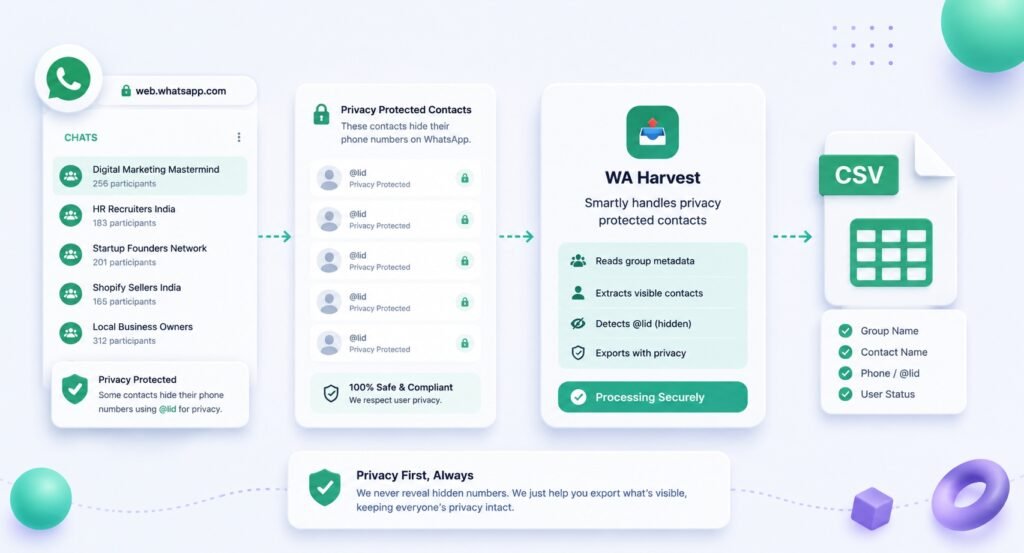
When you export contacts from WhatsApp Web groups you can access, not every record will expose a phone number in the same way. Some contacts have privacy-protected number information. A good export workflow should make that status clear without causing the rest of the file to fail.
WA Harvest handles this case by using one explicit value in the Phone Number column: Privacy-protected (@lid). The contact can remain in the CSV, the export continues, and you can review the record without guessing what is missing.
What privacy-protected means in the export
WA Harvest operates within WhatsApp Web and only for groups you can access. While processing selected groups, it can encounter normal WhatsApp contacts and contacts whose number is hidden. The hidden-number case is recorded exactly as:
Privacy-protected (@lid)
This is a status value, not a replacement number. It tells you that the phone-number information is privacy-protected in the data available through the WhatsApp Web group context.
The important practical point is that this status does not break the export. WA Harvest continues creating the CSV, rather than failing because one or more records do not provide a phone number for the Phone Number field.
Why a clear placeholder is better than a blank or a guess
A blank cell can be easy to misread. You may assume a row was skipped, that the CSV was incomplete, or that an error occurred during processing. A visible, consistent value lets you distinguish a privacy-protected number from a missing value you need to investigate for another reason.
Using Privacy-protected (@lid) also protects the integrity of the export. It avoids pretending that a number is available when it is not and avoids encouraging manual guesses or attempts to derive unavailable information.
In a review spreadsheet, this gives you a straightforward result:
- The contact record remains visible.
- The number-status condition is clear.
- The group association can still be retained in group columns.
- The rest of the selected export can complete normally.
That is more useful than stopping the entire file because a particular record has protected number information.
Where you will see the value
After selecting one or multiple groups in WA Harvest and choosing Export to CSV, open the timestamped download in Excel or another spreadsheet application. The CSV uses UTF-8 BOM formatting so it is Excel-friendly.
Review the standard columns:
NamePhone NumberGroup 1Group 2Group 3
Additional group columns appear when a contact is associated with more selected groups. For a privacy-protected contact, the Phone Number cell will display Privacy-protected (@lid) rather than a number. The rest of that record can still include the name and relevant group columns available through the selected export.
If multiple selected groups include the same contact, WA Harvest deduplicates the contact across those groups. The group association stays in the relevant Group columns, which makes it possible to understand where the privacy-protected record appeared without creating repeated rows.
A practical review process
Treat privacy-protected records as a normal part of the review step, not as a technical exception that must be “fixed.” This is a simple workflow:
- Export only the groups you can access. Use group discovery or search to identify the relevant groups, then select one or multiple groups for one export run.
- Open the CSV and filter the
Phone Numbercolumn. Look for the exact valuePrivacy-protected (@lid)if you need to identify protected records. - Review the contact in context. Check
Nameand theGroup 1,Group 2,Group 3, or additional group columns to understand the selected-group association. - Keep the value intact. Do not overwrite it with an assumed number, a placeholder that hides its meaning, or inferred data.
- Apply your own handling rules. Decide whether the record is needed for the limited purpose of your export, then store or remove it according to the privacy and retention rules that apply to you.
This process is deliberately simple. The export tells you what is available and what is privacy-protected; your review process should respect that boundary.
What this does not mean
A privacy-protected entry should not be interpreted as a workaround, an invitation to find a number elsewhere, or a signal that contact information may be used without further consideration.
It also does not change WA Harvest’s scope. WA Harvest is not an unauthorized-access tool, spam software, or a product affiliated with WhatsApp or Meta. It works inside WhatsApp Web with groups you can access and creates a structured CSV from that selected scope.
Group membership and the appearance of a record in an export do not establish consent, permission, delivery, or an appropriate outreach action. Handle any exported information responsibly and follow the applicable privacy, consent, and outreach requirements before taking further action.
Common mistakes to avoid
Treating protected rows as export errors
A Privacy-protected (@lid) value does not mean the export failed. WA Harvest is designed so privacy-protected contacts do not stop the CSV export.
Dropping context with the number
If you decide a protected record is outside your purpose, handle the full row carefully. The group columns can explain why it appeared in the selected export and support an informed review.
Replacing the status value
Do not convert Privacy-protected (@lid) into a generic blank note or attempt to populate it manually from an assumption. The exact value communicates important information about the record.
Exporting more groups than necessary
A narrow, purpose-led selection is easier to review. Use WA Harvest’s search and multi-group selection to choose only the groups relevant to the task, rather than treating a broad export as the default.
Free and Full exports
WA Harvest Free makes the first 20 contacts per export available. WA Harvest Full has no 20-contact limit. The privacy-protected handling remains the same: records with hidden numbers are marked Privacy-protected (@lid) and do not break the export.
A clean CSV is not about forcing every cell to contain the same type of information. It is about making the available information understandable, preserving group association, and showing protected values honestly.
If you need to export contacts from WhatsApp Web groups you can access while keeping privacy-protected records visible and clear, explore WA Harvest and review a small export before using it in your wider process.
Use WA Harvest only with WhatsApp Web groups you can access, and handle exported contacts responsibly under applicable terms and privacy requirements. Read the relevant official guidance when it applies to your workflow.
For the product-specific workflow described here, explore WA Harvest.