

Table of Contents
This guide explains a practical approach to Google Maps lead generation for agencies, with focused targeting and a reviewable output.
Google Maps Lead Generation for Agencies: The Core Workflow
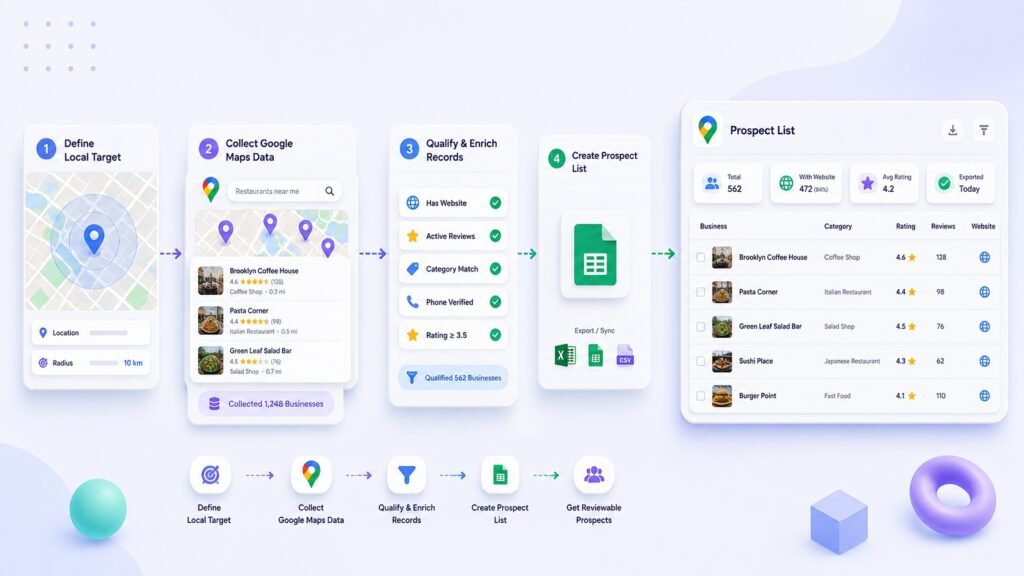
This agency prospecting workflow starts with a defined audience and location, then turns the result into a reviewable Google Maps lead list for the relevant client or campaign.
Need a more focused way to find local businesses for an agency offer? Google Maps can help you identify relevant prospects, but it does not replace strategy, qualification, or relevant communication.
The goal is a focused prospect list: businesses in the right area, with a clear reason they may fit your service, and enough structured context for a teammate to review before doing anything else.
Why the manual agency workflow becomes inefficient
Many agencies start with a broad search, copy businesses into a spreadsheet, and ask a team member to “find the good ones.” That creates a large, mixed list that needs another round of research before it can be used.
The manual approach creates friction in several places:
- Searches are too broad, so chains, irrelevant categories, and poor-fit locations enter the list.
- Different team members use different columns and naming conventions.
- The same business appears in nearby-city or category searches.
- The reason a business was included is not recorded.
- A list reaches outreach before anyone checks whether the offer is relevant.
The solution is not collecting more businesses. It is designing the list around a real agency decision.
What good agency output looks like
A useful list lets someone answer three questions quickly:
- Does this business fit the campaign?
- Why might the offer be relevant?
- What should happen next?
A practical agency spreadsheet might include:
| Field | Example use |
|---|---|
| Company name and category | Confirm the business type |
| City and address | Check territory fit |
| Website | Review the current web presence |
| Phone where available | Keep a public contact reference |
| Maps URL | Verify the source listing |
| Source query | Explain how the business was found |
| Fit reason | Note the observed reason to review |
| Status | Mark ready for review, poor fit, duplicate, or hold |
The fit reason is especially important. It keeps the workflow anchored to a relevant observation, such as “no website listed,” “outdated booking page,” or “multiple locations in target territory.” It is not a license to make assumptions about the business.
A practical workflow for agencies
1. Start with one offer and one segment
Do not begin with “local businesses.” Begin with a clear offer and the type of business most likely to need it.
For example:
- Offer: website redesign and booking-page improvement
- Segment: independent dental practices
- Territory: Austin and nearby suburbs
- Exclusions: hospital networks, national chains, multi-state franchises
This makes every later step easier. A clean segment is more valuable than a large directory.
2. Create a search matrix
Build a short set of repeatable keyword-and-location combinations.
| Category query | Location | Purpose |
|---|---|---|
family dentist | Austin | Core segment |
cosmetic dentist | Austin | Related service category |
dentist | Round Rock | Nearby territory |
Keep the original query with every record. That protects the context of the list and makes it easier to compare which searches produce useful businesses.
3. Collect structured research, not just names
Collect the business details that support your qualification process: name, category, website, phone where available, address, city, Maps URL, and source query.
Then add agency-specific review fields, such as website present, offer fit, assigned owner, and status. The raw listing details tell you what exists; the review fields tell your team what to do with it.
4. Clean and deduplicate the list
Before someone starts reviewing offers, remove obvious overlap. Use business name, phone number, website domain, and address together rather than relying on the name alone.
Standardize city names and website URLs. Then mark records that need a closer look instead of deleting them automatically. A missing website may be relevant for one campaign and irrelevant for another.
5. Qualify a small sample first
Review a sample before scaling the list. Check whether the businesses actually match the target, whether the website signal is meaningful, and whether the source queries are producing the right types of listings.
If the sample is poor, fix the target or query before collecting more data. This is faster than cleaning a large list built on the wrong definition.
6. Segment before handoff
Create smaller groups that match an agency action. For example:
- Austin dentists with no website listed
- Round Rock practices with an outdated mobile experience
- Cosmetic dentists with a booking page that needs review
The handoff should say more than “here are 500 leads.” It should provide a clear segment and a reason each row belongs there.
Common mistakes and limitations
- Using broad geography without exclusions. This produces more cleanup work.
- Confusing a listing with a qualified prospect. Listings need review.
- Collecting data without a source query. Context disappears quickly.
- Making claims from incomplete data. A missing website field is not proof that a business has no website.
- Skipping policy and privacy considerations. Review applicable Google terms, privacy rules, and outreach policies before collecting, storing, or using data.
A more repeatable collection workflow
Map Lead Finder helps agencies turn Google Maps keyword-and-location searches into a structured lead table. It supports multiple query combinations, searchable and sortable rows, deduplication, CSV export, and configured webhook sending for automation workflows.
The output can include business name, category, website, phone, address, city, rating details, Maps URL, CID, and coordinates when available. In Pro, website email enrichment can return up to three public emails per lead when available.
That does not replace agency judgment. It reduces the repetitive collection work so the team can spend more time defining segments, reviewing fit, and improving the next step.
Final takeaway
Google Maps lead generation works best for agencies when it is treated as a qualification workflow, not a race to collect the biggest list.
Start with one offer, one segment, and repeatable searches. Keep the context, clean the records, review a sample, and hand off smaller groups with a clear reason for action. If manual collection is slowing that process down, Map Lead Finder helps you create a structured, repeatable Google Maps workflow.
Use Google Maps responsibly and review the applicable <a href=”https://cloud.google.com/maps-platform/terms”>Google Maps Platform Terms</a> before collecting, storing, or using data.
For a structured local-business prospecting workflow, explore <a href=”https://insanealgo.com/product/map-lead-finder/”>Map Lead Finder</a>. Review available data before use and follow applicable privacy and outreach requirements.
When a Google Maps lead generation for agencies is useful
A Google Maps lead generation for agencies is useful when a team needs a clear, reviewable starting point for a local-business decision instead of a loose collection of copied listings. The value of a Google Maps lead generation for agencies comes from defined searches, usable fields, and a human review before any next step. Keep the Google Maps lead generation for agencies focused on relevance and responsible use, not raw volume.